 clane
 Saidly
Transcription for Windows
Your recordings, typed out. Nothing uploaded.
It's 11 pm and you have a 50-minute interview to quote from. You could scrub through it at half speed, or drop the file on Saidly and search the text while the kettle boils. It all runs on your own PC.
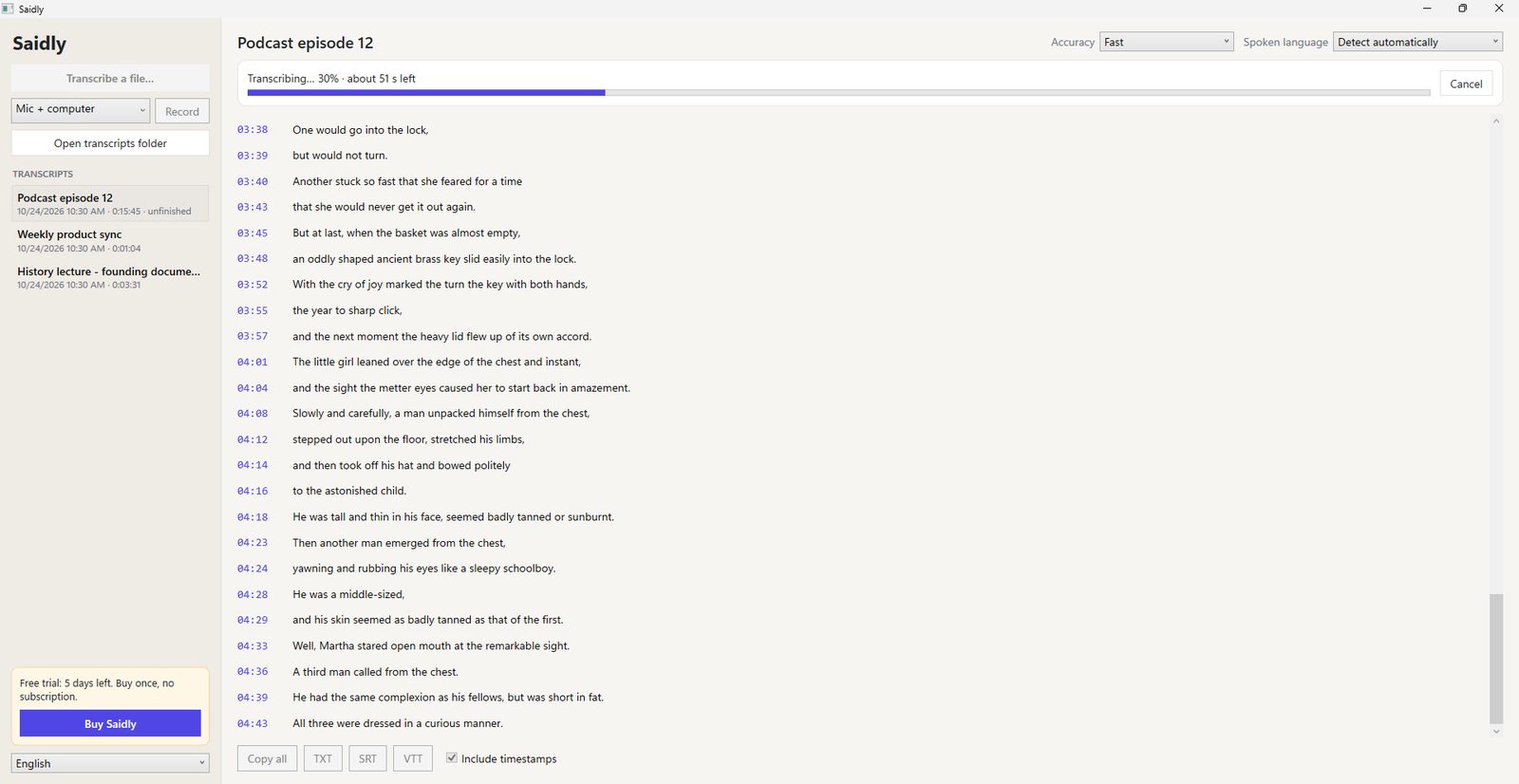
Recorded on a Windows PC: open the file, and the transcript fills in a minute of audio at a time.
Interviews, patients, clients. Some audio shouldn't leave the room.
Most transcription apps send your file to a server and read it there. That's fine for a podcast. It's less fine for a job interview, a therapy note or a call with a client who asked you to keep things private.
Saidly does the work on your PC with an open speech model (Whisper). The model downloads once, the first time you transcribe. After that you can pull the network cable and it still works.
- 0files sent to a server
- ~100spoken languages recognized
- 80 sto transcribe a 15-minute recording in Fast mode on our test PC
We read the 52 unhappy reviews of the top three transcription apps.
The 150 most recent Microsoft Store reviews of the three highest-ranked "transcribe" apps, October 2026. 52 gave three stars or fewer. We grouped them by what people wrote. Some reviews land in more than one group.
"Says it's free until you actually try to use it." A paywall, a subscription or an upgrade box before the first transcript.
Saidly: the price is on the box. US$14.99 once, 7 days to try first."For a 3 minute video it only gave me error." Failed jobs, or text with whole sentences missing.
Saidly: long files go in one-minute pieces, so one bad patch doesn't sink the whole job."Every two seconds it interrupts me." Pop-ups asking for a review or an upgrade in the middle of work.
Saidly: no review pop-ups, ever. No ads.What it does
Long files, with the time left on screen
A two-hour lecture is fine. Lines appear as they're done, the bar tells you how long is left, and Cancel keeps everything already typed.
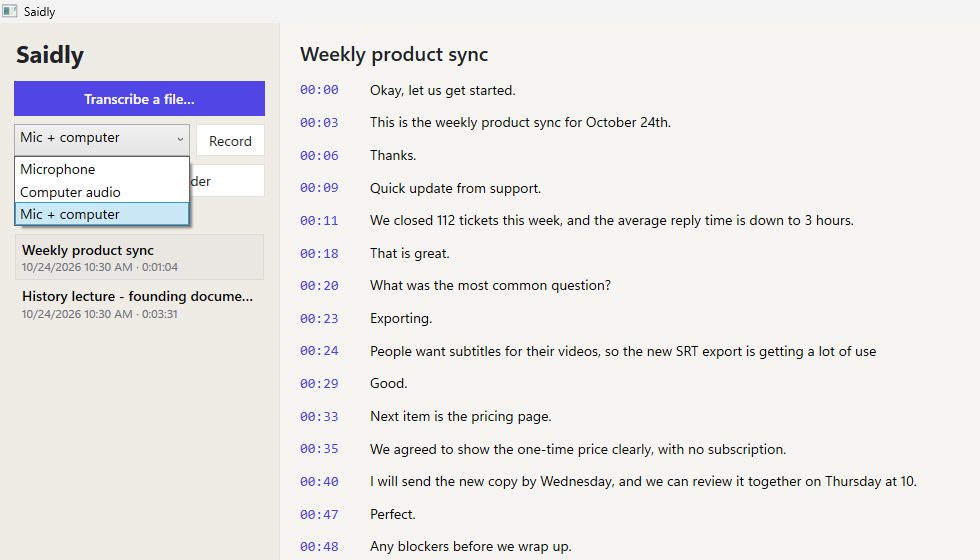
Record the meeting itself
Pick your microphone, your computer's sound (Zoom, Teams, Meet, YouTube) or both. Press Stop and it starts typing. The audio is kept as a WAV next to the transcript.
Subtitles in one click
Export SRT or VTT for YouTube, Premiere or DaVinci, or plain TXT with or without timestamps.
Fix a word, keep it fixed
Click any line and type. A misheard name is corrected in the transcript and in every export after it.
Saved where you can find them
Every transcript sits in Documents\Saidly, so an update or a reinstall doesn't wipe your history.
Three speeds
Fast for a quick read, Balanced for most recordings, Most accurate when names and numbers matter. Right-click any audio or video file and choose Open with Saidly.
Switching from a subscription app?
- Download your old transcripts first. Some services delete them when the plan ends.
- Cancel in your Microsoft account (Services & subscriptions). Uninstalling doesn't stop the billing.
- Keep the audio. Saidly can re-run any old MP3, M4A or MP4 for you.
Try a week of your own recordings. Then pay once.
The Microsoft Store gives you 7 days with everything on. If it saves you an evening of typing, it's US$14.99 one time. No subscription, no account, no minute limits.
Get Saidly on the Microsoft StoreQuestions
How accurate is it?
On clear speech, close to what you'd type yourself. Crosstalk, heavy accents and bad microphones lower it, as with any transcription. Most accurate mode helps with names and numbers, and you can fix any word by clicking it.
Does it tell speakers apart?
Not yet. Each line gets a timestamp, but not a speaker name.
Does it need the internet?
Only once, to download the speech model the first time you transcribe (about 150 MB for Fast, more for Most accurate). After that it works offline.
Which languages?
About 100 spoken languages, detected automatically or picked from the list. The app itself is in 12 languages.
Will it slow down my PC?
It uses the processor while transcribing, like video export does. A 15-minute file took about 80 seconds in Fast mode on our test PC. Close it and nothing runs in the background.
Is there a Mac version?
Not yet. Saidly is Windows 10 and 11 only for now.
Something isn't working.
Email [email protected] or open the support page. Privacy details are in the privacy policy.